A one-liner builds the minimum. A plan builds the app.

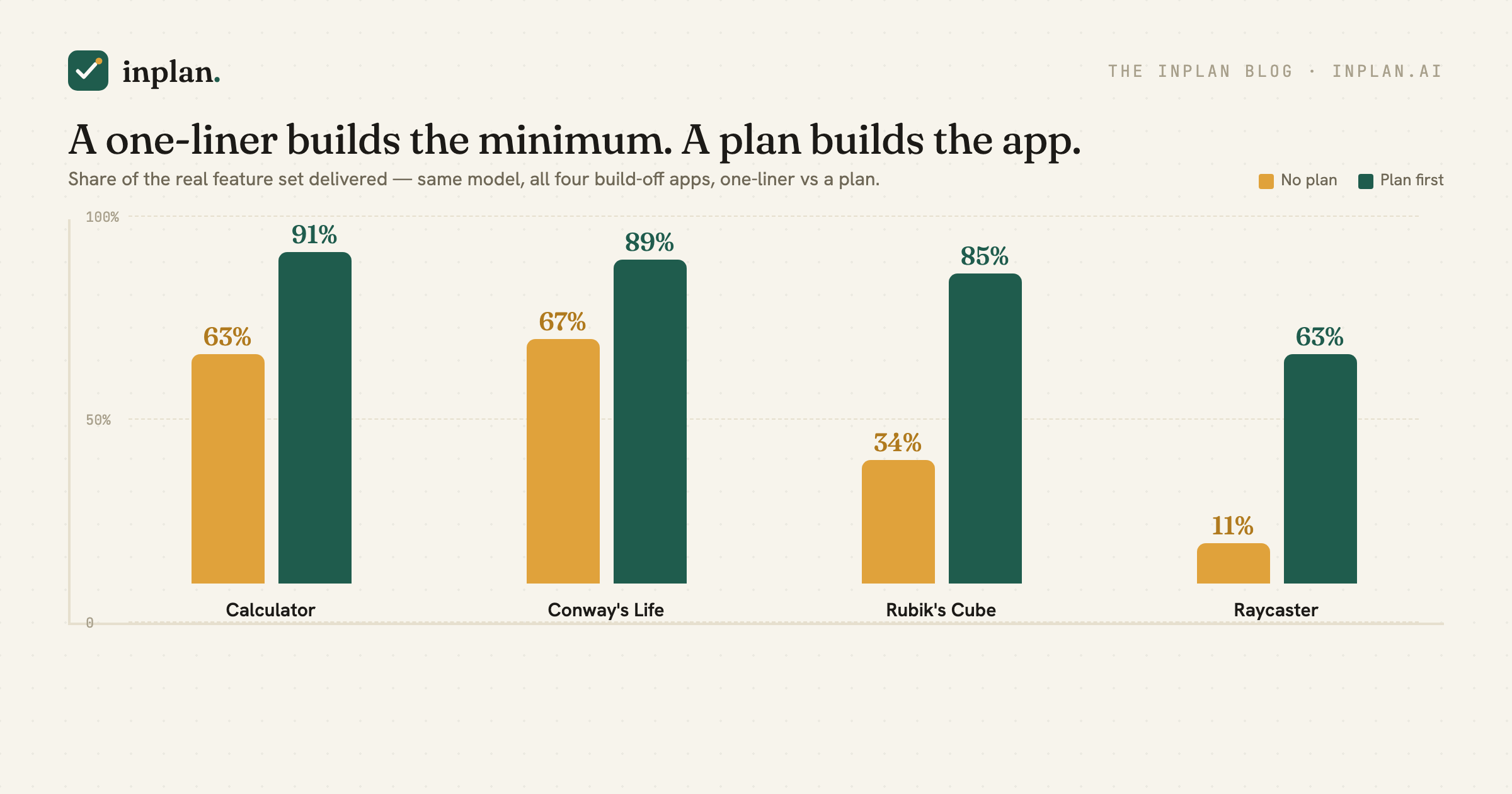
tryai.dev's build-off had twelve models each build the same little apps from a one-line prompt, scored on whether the result worked. We borrowed their idea — the same four apps, the same one-line prompts — to ask a different question: not does it work, but how much of the app did you actually get? We built each one ourselves, twice, on the same model — Claude Opus 4.8 — once from the one-liner, once from a plan that spells out what the app really is. Then we counted features.
The answer is the chart above. From the one-liner, a strong model builds the smallest thing that is recognizably a calculator, or a Life, or a cube — and stops. From a plan, it builds most of the real thing — and the gap is big enough that whole features exist on one side and simply aren't there on the other.
What we did
We took all four of tryai.dev's apps — a calculator, Conway's Game of Life, a Rubik's cube, and a first-person raycaster — and built each one two ways, ten independent attempts per side, on the same model:
- No plan: the build-off's exact one-liner. E.g. the calculator's: “Digits, operators, clear, equals, correct operator precedence, real calculator look.”
- Plan first: the same task, but with the decisions worked through into a plan that enumerates the feature set a real version of that app actually has.
Then we graded every build against that full feature set with an executable rubric — clicking buttons, driving the logic through a testing hook, checking each feature is really there. We validated each grader against a deliberately full-featured build and a deliberately minimal one before trusting a number.
The result: you get about half the app
| App (share of real feature set) | No plan | Plan first |
|---|---|---|
| Calculator | 63% | 91% |
| Conway's Life | 67% | 89% |
| Rubik's cube | 34% | 85% |
| Raycaster | 11% | 63% |
Same model, same task, same afternoon. Across the four, the one-liner delivered anywhere from a tenth to two-thirds of the app; the plan delivered most to nearly all of it. And it wasn't random dropout — whole features were absent from every single no-plan build and present in nearly every plan-first one:
- Calculator — no-plan builds shipped digits and operators, but 0 / 10 had a backspace, repeated-equals, or a memory. Plan-first: 10 / 10 on all three. (Parentheses were the lone exception — the independent plan rarely thought to name them, so neither side reliably had them. That's the honesty tax of double-blind, and it's why the score is 91%, not 100%.)
- Conway's Life — the rules were correct either way, but 0 / 10 no-plan builds had an adjustable grid, a wrap toggle, or pattern presets. Plan-first: 10 / 10, 9 / 10, and 7 / 10.
- Rubik's cube — every no-plan cube could scramble and solve, but 0 / 10 had a move counter, timer, undo, or reset. Plan-first: 9 / 9 on all four, plus manual face-turns in 7 / 9.
- Raycaster — no-plan builds walked with WASD and stopped; 0 / 10 had mouse-look, a minimap, or a HUD. Plan-first: 10 / 10. The blind plan treated FOV and resolution as fixed constants rather than on-screen controls, though, so those two never appeared — which is exactly why raycaster's plan-first number is 63%, not higher.
The model isn't failing. It's doing exactly what the words said — and the words said “a calculator,” not the twenty things a calculator is.
How we ran it — and how to reproduce it
None of this is subjective; you can rebuild the whole thing. The setup, per app:
- Same model, every build. One frontier model (Claude Opus 4.8) built all eighty index.html files — ten per arm, four apps. Neither column got a stronger model, more tokens, or a second try.
- Two prompts per app. No plan is the build-off's verbatim one-liner plus a tiny output contract (one self-contained
index.htmland a testing hook so a script can drive it). Plan first is a plan that enumerates the feature set a real version of the app has — written, deliberately, without sight of the grader (the double-blind note above). Both prompts carry the identical testing contract; the only difference is whether the feature set was spelled out. - Ten independent builds per arm — fresh context each time — so a feature landing in 0/10 or 10/10 is a pattern, not a coin toss.
- Executable grading. A Playwright script drives each build through a global testing hook (
window.CALC,LIFE,CUBE,RAY) — clicking the real buttons, running the logic, reading state back — and inspects the DOM and source for features that can't be exercised blind (a minimap, an FOV slider). Every check is a strict yes/no. - How the percentage is computed. A build's score is the number of checks it passes; its completeness is that count over the rubric size (say 14 of 15). An app's number is the mean across its ten builds — so the plan-first calculators averaging 13.7 of 15 checks is 91%. Every check weighs the same: parentheses count exactly as much as addition, so a rarely-used feature isn't discounted. (Equivalently: total checks passed across all ten builds, divided by ten times the rubric size.)
- Every grader validated first. Before trusting a number, we pointed each grader at a deliberately full-featured reference build and a deliberately bare one; we kept the grader only once it gave the full build near-full marks and the bare build a low score — calculator 15/15 vs 6/15, Life 10/10 vs 4/10, cube 9/9 vs 2/9, raycaster 8/8 vs 0/8.
The rubrics in full — this is the “real feature set” each build was scored against:
- Calculator (15 checks): add, operator precedence, parentheses, decimals, divide-by-zero, negatives, chained operations, clear, percent, sign-toggle, backspace, decimal-guard, repeated-equals, memory (M+/MR/MC), keyboard input.
- Conway's Life (10): correct rules (verified with a blinker and a glider), the five core controls, clear, randomize, speed control, generation counter, population counter, pattern presets, adjustable grid size, wrap-around toggle.
- Rubik's cube (9): valid state after moves, scramble + solve, manual face turns, move counter, timer, undo, scramble length, reset, keyboard orbit.
- Raycaster (8): mouse-look, strafe, minimap, wall textures, adjustable FOV, resolution control, sprint, on-screen HUD.
The one-liners are the build-off's own — e.g. the cube's, verbatim: “a colorful, 3D-looking Rubik's Cube with Scramble and Solve buttons that visibly animate the rotations.” Same model, same contract, ten runs each. The only thing that moves between the two columns is whether the feature set got written down before the code did.
See the actual plan — inplan's Markdown format, with the comments that produced it
Here's a trimmed slice of the calculator plan as an inplan .plan.md. The plan body carries inline anchored comments — each [text](#cmt-id) link ties to a thread in the single trailing <!--inplan --> block, where the reviewer's open question and the author's resolution live together. These three threads are why the plan-first builds ship a backspace key, repeated-equals, and ± / % — the one-liner builds never did.
It's a dial, not a switch
“Plan first” makes it sound binary — you plan or you don't. But planning in inplan is a conversation: the agent drafts, raises the open questions inline as comments, you answer them, it revises. So we took the calculator and ran it through exactly that loop — a reviewer raising feature questions, an author resolving them, both still blind to the rubric — and measured how complete the build was after 0, 1, 4, and 8 rounds.
Every round is worth features. The one-liner starts at 63%. A single pass of commenting — the reviewer asking about clear-versus-backspace and repeated-equals, the author deciding — jumps it to 86%. By four rounds the build hits 100% of the rubric; the eighth round adds nothing, it just settles (98% is noise, not a regression). That's the actual shape of planning: a few good rounds of resolving open questions gets you the whole app, and then you're done.
And the loop beats the one-shot. Four rounds of back-and-forth reached 100%, where the single enumerated plan in the table above landed at 91% — because the conversation surfaced parentheses that a one-pass list forgot to name. The comments are where the missing features come from.
Why the minimum is the default
Ask a coding agent for “a calculator” and it builds the smallest artifact that is unmistakably a calculator: a keypad, an operator or two, an equals. That satisfies the sentence. Everything else — parentheses, a percent key, keyboard support, a memory, undo — is implied by the word “calculator,” and the agent has no reason to infer that you meant all of it. It fills the gap the cheap way: leave it out.
A plan is where the vague noun becomes a list. It's not that the model couldn't build parentheses — when the plan named them, ten out of ten did, correctly. It's that nobody asked. This is the same thing we keep measuring from a different angle: the agent's output is bounded by what you actually specified, and a one-liner specifies almost nothing.
The honest edges
Two things worth saying plainly. First, this is about completeness, not correctness: on the basics, a frontier model is fine with or without a plan — the Life rules were right in every build, every cube could scramble and solve, every raycaster let you walk around. The entire gap is in the features a one-liner leaves implied. Second, the raycaster we graded a little differently — on which features are present (mouse-look, minimap, FOV, textures, sprint, a HUD), read from the code and the on-screen controls, not on how good the walls look, because you can't score rendering objectively. It had the widest gap of the four and the lowest plan-first ceiling (63%), because the blind plan left FOV and resolution as internal constants instead of controls — a real, honest miss, not a rounding error. Which is the whole point: four different apps, four different rubrics, all pointing the same way. Third, and worth repeating: the plans and the rubrics were written double-blind. If the two had been drawn up together, plan-first would score ~100% — and prove nothing but that we can copy a list. They weren't, and it doesn't: plan-first lands at 63–91%, with the gaps falling exactly where an independent plan and an independent rubric happened to describe the app differently. That's what an honest agreement looks like — two people describing the same calculator from memory, matching on the bulk and differing at the edges.
Which is the whole pitch
Almost nothing you build at work arrives as a complete spec. It arrives as a vague noun — “a settings page,” “an export feature,” “a dashboard” — that implies a couple dozen decisions and features nobody wrote down. Hand that to a coding agent and you get the minimum that satisfies the words. The plan is where the noun becomes the list, before the code is written.
That's what inplan is for: you and your coding agent turn the vague ask into the actual feature set — it drafts and raises the open questions inline, you answer them in place — and then it builds the whole app, not the smallest thing that passes for one.
Get the whole app
inplan is where you and your coding agent turn a vague spec into the real feature set before it builds — it drafts, raises the open questions inline, and you settle them together. Free and open source.
inplan on GitHub inplan.ai